Faster, Lighter, and Finally More User-Friendly
The goal of Microsoft’s upcoming significant update for Windows 11 is to make the operating system quicker, less invasive, and more adaptable. The company is finally implementing significant adjustments after months of consumer concerns about strong AI integration, frequent notifications, and performance problems.
These enhancements, which might greatly enhance the daily user experience, will start to roll out to beta testers in the upcoming months, according to updates posted on the Windows Insider Blog.
A Faster and More Efficient Windows 11
One of the most important upgrades coming to Windows 11 is better performance and reduced memory usage.
Microsoft plans to:
- Lower the baseline memory footprint
- Improve system responsiveness
- Reduce lag in everyday operations
This means your PC will have more available RAM for apps, which is especially useful since upgrading hardware isn’t always practical. For users running multiple applications, this could be a game-changer.
File Explorer Finally Gets a Speed Boost
The File Explorer has long been a pain point for Windows 11 users. Microsoft is now addressing this with:
- Faster file loading times
- Improved responsiveness
- Smoother navigation
These changes aim to make file management quicker and more reliable, eliminating one of the most frustrating aspects of the OS.
Smarter and Less Intrusive Copilot Integration
Microsoft’s AI assistant, Copilot, has received mixed reactions since its introduction. Many users found it intrusive and unnecessary.
Now, Microsoft is taking a more balanced approach:
- Reducing unnecessary Copilot entry points
- Removing it from apps like Snipping Tool and Notepad
- Focusing only on useful, well-designed experiences
This shift shows that Microsoft is listening to feedback and trying to make AI helpful rather than overwhelming.
Fewer Notifications and Better Widget Control
Notifications and widgets have often disrupted the user experience. With upcoming updates:
- Widgets will become more glanceable and less distracting
- Users will have greater control over when and how widgets appear
- Notifications will be reduced significantly
You’ll also be able to customize or disable widgets more easily, making the interface cleaner and more personalized.
More Control Over Windows Updates
Windows updates have long been criticized for being disruptive. Microsoft is now introducing several improvements:
- Ability to skip updates during initial setup
- Longer pause options for updates
- Fewer forced restarts
- Option to restart or shut down without installing updates immediately
These changes will give users more control and predictability, reducing frustration during critical tasks.
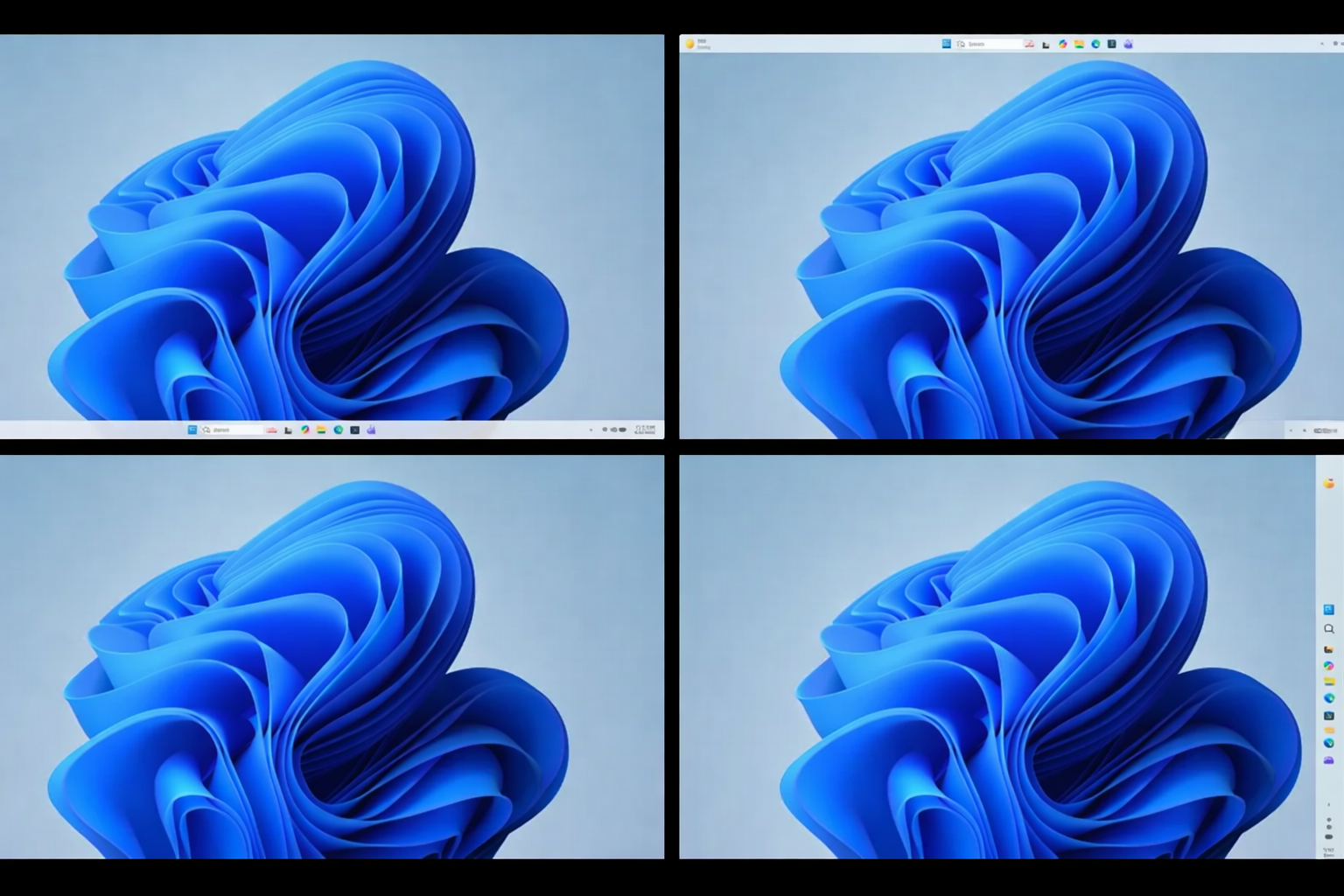
Taskbar Flexibility Is Back
In a move many users have been waiting for, Microsoft is bringing back taskbar customization:
- Reposition the taskbar to the top, bottom, or sides
- More control over layout and usability
This small but important update enhances personalization and usability across different workflows.
Improved Stability and Connectivity
Microsoft is also focusing on reliability improvements, including:
- Fewer system crashes
- Better driver compatibility
- More stable Bluetooth and USB connections
- Improved wake-from-sleep behavior
These upgrades aim to ensure that Windows 11 runs smoothly and consistently on a wide range of devices.
A Better Out-of-the-Box Experience
New users will benefit from a smoother setup process:
- Option to skip updates during setup
- Controller support for PIN creation (useful for handheld devices)
- Improved first-time user experience
This is especially important for emerging devices like handheld gaming PCs, making Windows feel more like a native gaming platform.
Feedback Hub and Insider Program Improvements
Microsoft is also upgrading how users provide feedback:
- A redesigned Feedback Hub for easier reporting
- Faster access to new features for Insiders
- Clearer communication on how feedback shapes updates
This shows a stronger commitment to user-driven development.
Why These Updates Matter
These changes represent a major shift in Microsoft’s approach. Instead of adding more features, the company is focusing on:
- Performance optimization
- User control
- Reduced system bloat
- Meaningful AI integration
For many users, this could finally make Windows 11 feel like a polished and reliable operating system.
Final Thoughts
Microsoft’s upcoming Windows 11 updates look promising. By addressing long-standing issues like performance, intrusive updates, and excessive AI integration, the company is taking a step in the right direction.
However, the real test will be execution. If Microsoft delivers on these promises, Windows 11 could transform from a frustrating experience into a fast, efficient, and user-friendly platform.
For now, all eyes are on the Windows Insider rollout—and whether these improvements truly live up to expectations.