Google’s Smartest Android Update in Years
Android 17 Deep Dive – The Best Android Update for Multitasking, Privacy, and Everyday Performance
Google is finally bringing practical innovation back to Android, and Android 17 may be the most useful Android update users have seen in years. Instead of focusing only on flashy AI demos and experimental concepts, Google is improving the real-world smartphone experience with smarter multitasking, better privacy controls, gaming upgrades, and cleaner system design.
During the latest Android showcase, Google gave Android 17 its own spotlight away from the crowded developer conference announcements. That decision turned out to be a major win for Android fans because users finally got a detailed look at features that genuinely improve daily phone usage.
After testing the Android 17 beta and reviewing Google’s latest deep-dive presentation, one thing becomes very clear: Android 17 is designed to fix the frustrations Android users deal with every single day.
From floating app bubbles to native controller remapping and upgraded privacy settings, Android 17 focuses on usability instead of unnecessary gimmicks. And honestly, that’s exactly what Android users have been waiting for.
Google Gives Android 17 the Attention It Deserves
For several years, Android announcements often felt buried beneath artificial intelligence updates, cloud technology reveals, and experimental Google projects during major events. Many Android users felt the operating system itself was no longer the main attraction.
This year, however, Google separated the Android showcase from its larger event presentations. That simple change gave Android 17 room to breathe and allowed the company to properly explain its newest features.
The dedicated Android presentation focused heavily on practical improvements, performance upgrades, multitasking tools, privacy enhancements, and customization options. Instead of rushing through features, Google explained how Android 17 improves real-life smartphone use.
That approach made Android 17 feel more polished, mature, and user-focused than many previous Android releases.
Android 17 App Bubbles Make Multitasking Faster Than Ever
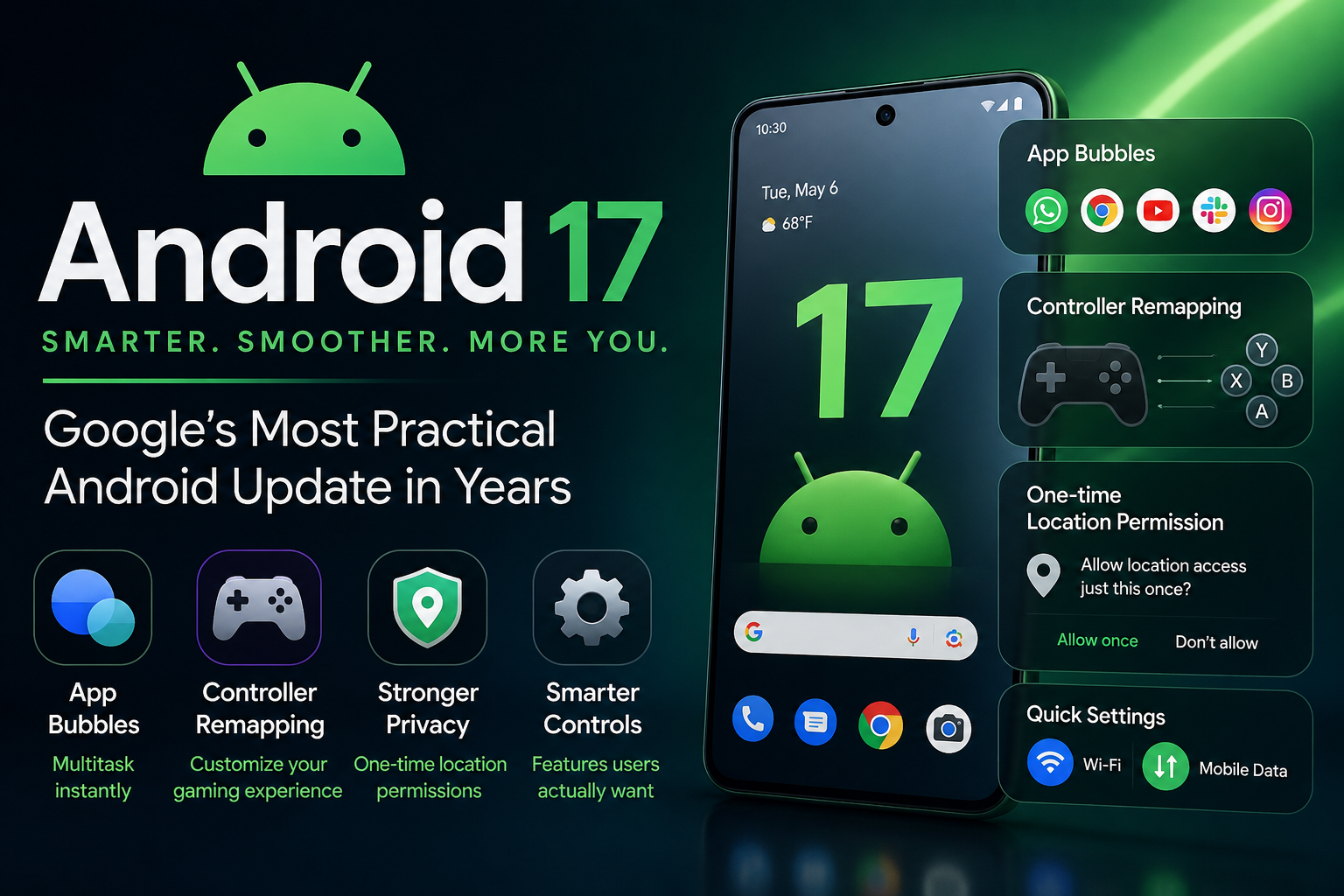
One of the biggest highlights of Android 17 is the brand-new app bubbles feature, which dramatically improves multitasking on Android smartphones.
The feature allows users to pin up to five apps in floating bubbles for instant access from anywhere on the device. While the concept sounds simple, the real-world experience feels surprisingly powerful.
Instead of constantly swiping through recent apps or struggling with split-screen mode, users can instantly jump between conversations, media apps, browsers, and productivity tools without interrupting their workflow.
For example, users can keep apps like Instagram, WhatsApp, Slack, Chrome, and YouTube Music pinned for quick access throughout the day. Replying to messages while reading articles, changing music during work, or switching between business chats becomes incredibly smooth.
This multitasking system is especially valuable for compact smartphones where screen space is limited. Traditional split-screen mode often feels cramped and messy, but app bubbles keep everything organized and easy to reach.
Android 17 finally makes multitasking feel natural instead of frustrating.
Native Controller Remapping Is a Huge Upgrade for Android Gaming
Mobile gaming continues to grow rapidly, and Google is finally giving Android gamers a feature they have wanted for years.
Android 17 introduces native controller remapping directly inside system settings. This means users can now customize controller buttons, triggers, and analog sticks without relying on individual game settings.
Previously, Android gamers faced inconsistent controller support across different games. Some titles offered custom controls, while others forced players to use awkward default layouts. That inconsistency created a frustrating gaming experience.
Now, Android 17 solves the problem at the operating system level.
Whether users play racing games, shooting games, cloud gaming services, or emulators, controller customization becomes far more flexible and reliable. Gamers can finally create layouts that match their personal preferences without depending on developers to add support.
For mobile gaming enthusiasts, this may become one of Android 17’s most appreciated upgrades.
Android 17 Privacy Features Focus on Location Security
Privacy remains one of the most important concerns for smartphone users, and Google is strengthening Android security once again.
Android 17 improves one-time location permissions, making temporary location access easier to understand and manage. Apps can now access a user’s location only for a single session when permission is granted.
This feature may sound minor at first, but it solves a serious problem many users face today.
Countless apps continue tracking location data long after users stop actively using them. In many cases, users forget which apps still have background location access enabled. Android 17 aims to reduce that risk by making temporary permissions more visible and easier to control.
Google’s renewed focus on smartphone privacy shows that the company understands growing concerns around data collection and digital security.
For Android users who care about privacy, Android 17 delivers meaningful improvements instead of empty promises.
Android 17 Brings Back Features Users Actually Missed
One of the most interesting things about Android 17 is that Google is listening more closely to user feedback.
Several smaller but highly requested features are finally returning or improving in this update.
Per-App Dark Themes
Android 17 expands dark mode controls with per-app customization options. Users can now choose which apps use dark themes independently, allowing for a more personalized experience.
Cleaner Split-Screen Interface
Google has refined split-screen multitasking to make it easier and less cluttered. Navigation feels smoother, and switching between apps is more intuitive.
Separate Wi-Fi and Mobile Data Toggles Return
Many Android users complained when Google merged Wi-Fi and mobile data controls into a single internet toggle. In Android 17, separate toggles are making a comeback inside Quick Settings.
It may seem like a small change, but longtime Android users will appreciate the improved convenience and faster connectivity management.
This decision also shows that Google is finally responding to years of user feedback instead of ignoring it.
Android 17 Feels Like a More Mature and Refined Android Experience
Perhaps the biggest strength of Android 17 is its overall philosophy.
Google is not trying to completely reinvent Android this time. Instead, the company is refining the experience users already love.
That strategy makes Android 17 feel more stable, practical, and thoughtful compared to updates that focused heavily on visual redesigns or experimental features.
Everyday improvements often matter more than flashy announcements. Faster multitasking, smarter gaming controls, stronger privacy, cleaner settings, and better usability are the kinds of features users actually notice after weeks of use.
After spending time with the Android 17 beta, many users are already describing it as one of the smoothest and most user-friendly Android updates in recent memory.
Why Android 17 Could Be Google’s Most Important Update in Years
Android 17 may not be the most dramatic Android release ever, but it could easily become one of the most important.
Instead of chasing trends, Google focused on solving real user problems. That decision gives Android 17 a level of polish and practicality that has been missing from some previous updates.
The combination of floating app bubbles, advanced multitasking, gaming enhancements, improved privacy settings, and long-requested UI fixes makes Android 17 feel genuinely useful.
In many ways, Android 17 represents a smarter direction for Google — one where user experience matters more than flashy marketing.
And if this approach continues, Android users may finally be entering a new era where updates are designed around convenience, performance, and everyday usability first.
Android 17 proves that sometimes the best upgrades are the ones users actually notice every single day.